
Updated June 2026

6 Best Chord Progression Generators in 2026

Whether you write songs in a browser or produce inside a DAW, there's a chord progression tool for your workflow. This guide covers six of the best options in 2026 — three free browser tools and three plugins.

Disclosure: Chord Sequence (#1) is our own tool. All competitor data is sourced from their public websites as of June 2026.

Elías Corsino Saldaña

Musician & Software Developer

Quick summary

  • #1 Chord Sequence — Best free browser tool. 37 chord types, 13 rhythm styles, WAV export. No account.
  • #2 ChordSeq AI — Free AI generator in the browser. Neural network chord suggestions, MIDI export.
  • #3 DBDone AI Chords — Free DAW plugin with AI text prompts. VST3/AU/AAX, 60 credits free.
  • #4 OneMotion Chord Player — Free browser tool for chord exploration. Good for beginners.
  • #5 Mario Nieto Chord Generator — €29 DAW plugin. 57 scales, advanced voicing, Mac/Win/iPad.
  • #6 Cthulhu by Xfer Records — $39 DAW plugin. Chord memory + polymetric arpeggiator. 150+ presets, VST/AU/AAX.

Feature comparison

Tool Price Type Audio AI Export
Chord Sequence Free Browser WAV + MIDI
ChordSeq AI Free Browser MIDI
DBDone AI Chords Free / €89 Plugin ✅ (DAW) MIDI
OneMotion Free Browser
Mario Nieto €29 Plugin ✅ (DAW) MIDI
Cthulhu (Xfer) $39 Plugin ✅ (DAW) MIDI
#1 · Our pick

Chord Sequence

Best free browser-based chord progression builder

Free forever

Browser tool

Chord Sequence editor showing a jazz chord progression with rhythm playback

Chord Sequence is a free browser-based chord progression builder that lets you compose, hear, and export chord progressions without creating an account. It supports 37 chord types — from simple major and minor triads to maj7, m9, diminished, augmented, suspended, and add9 voicings — and plays them back with real recorded samples across 13 rhythm styles: pop, rock, jazz, lo-fi, worship, Latin, and more.

The drag-and-drop editor lets you build multi-section songs, switch keys in real time with the built-in transposer, and export the result as a WAV file ready to drag into any DAW. It also includes three standalone music theory tools — an interactive circle of fifths, a chord transposer, and a key detector — plus a growing library of song chord charts with synchronized playback and free music theory articles.

Strengths

  • 37 chord types including jazz voicings and extensions
  • 13 rhythm styles with real audio samples
  • WAV export ready for DAW use
  • Works offline after first load
  • No account, no paywall, no ads
  • Circle of fifths, transposer, and key detector included

Limitations

  • No AI chord generation
  • No real-time DAW integration

Best for: Songwriters and producers who want a complete free tool with real sound and export — and no subscription.
#2

ChordSeq AI ↗

Best free AI chord generator for the browser

Free

Browser tool

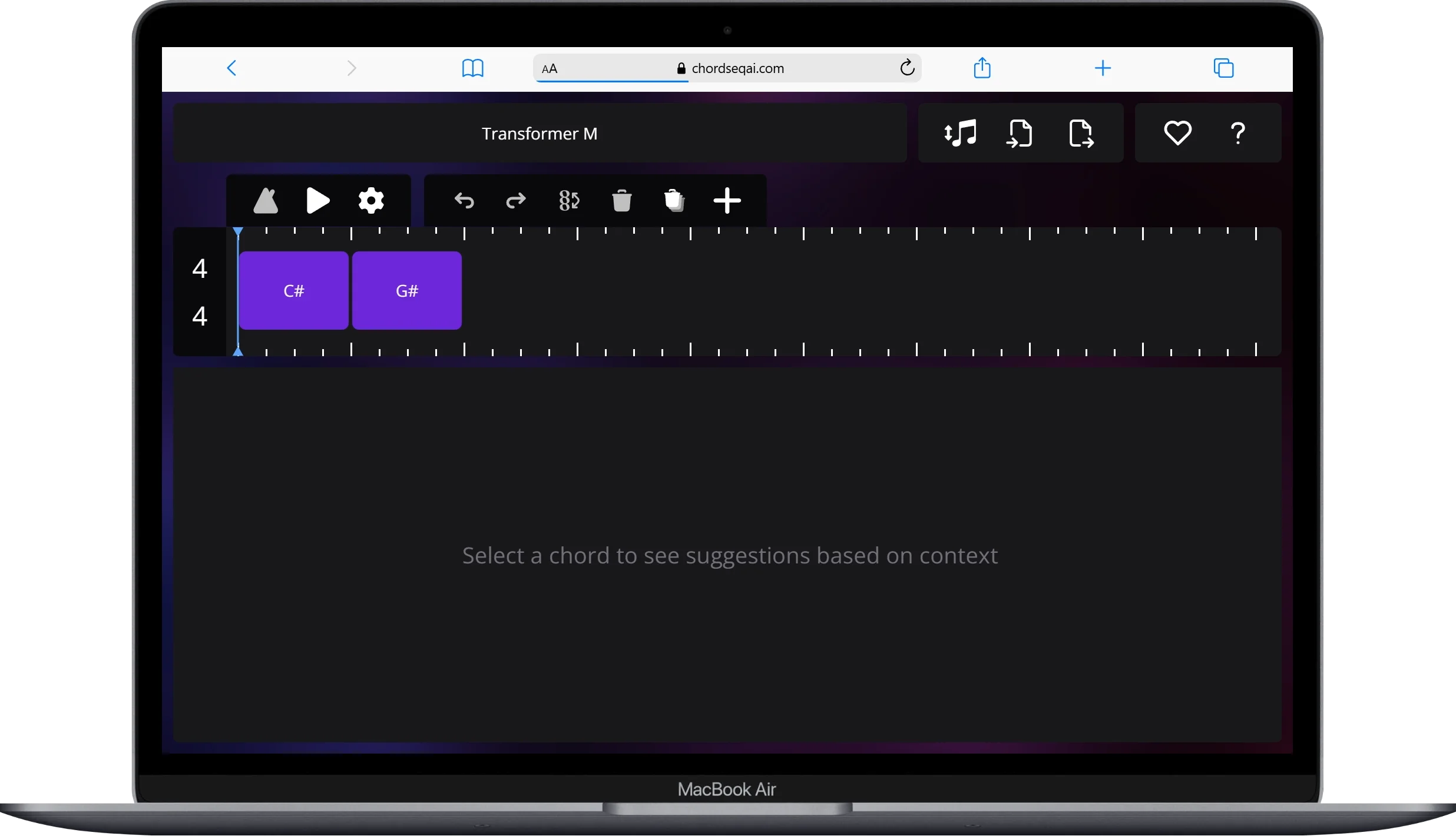
ChordSeq AI interface showing AI chord progression generation in the browser

ChordSeq AI is an open-source, browser-based chord generator that uses neural networks to predict the next chord in a progression. You can choose between several model types — Recurrent Network, Transformer (small, medium, or large), and Conditional Transformer variants — each offering a different balance between speed and accuracy. The conditional models let you specify a genre or musical period, which produces style-specific results.

The tool generates MIDI files that you can download and import into any DAW. It's a genuinely interesting project for composers who want AI assistance without spending money — and because it's open-source, the model architecture is fully transparent. One limitation: it currently works on desktop only, so mobile users are excluded.

Strengths

  • Free, open-source
  • Multiple AI model options (Recurrent, Transformer)
  • Genre/period-conditional generation
  • MIDI export
  • No account required

Limitations

  • Desktop only (no mobile support)
  • No audio playback of progressions
  • No rhythm styles or WAV export

Best for: Composers who want AI-assisted chord suggestions and MIDI output without paying for a subscription.

#3

DBDone AI Chords ↗

Best free AI chord plugin for your DAW

Free (60 AI credits) · €89 one-time

DAW Plugin (VST3 / AU / AAX)

DBDone AI Chords is a DAW plugin (VST3, AU, AAX) for macOS and Windows that generates chord progressions using a text prompt. You describe what you want — "lo-fi jazzy melancholic chords" or "upbeat pop progression in C major" — and the AI returns a chord sequence you can immediately play back inside your DAW. You can control velocity range, spread (adds humanization), transpose, and note length.

The free tier includes 60 AI credits to start. A one-time €89 payment unlocks the full plugin with ongoing monthly credits. Because it runs inside your DAW, DBDone integrates directly into your production workflow — no copy-pasting or file importing required.

Strengths

  • Text-prompt AI generation ("lo-fi jazzy melancholic")
  • Works inside your DAW (Ableton, Logic, FL Studio)
  • Velocity, spread, transpose controls
  • Free tier with 60 credits
  • VST3 / AU / AAX support

Limitations

  • Requires a DAW to use — not browser-based
  • Free credits are limited
  • macOS and Windows 64-bit only

Best for: Producers who want AI chord generation directly inside their DAW without switching to a browser tool.

#4

OneMotion Chord Player ↗

Simple free chord player for the browser

Free

Browser tool

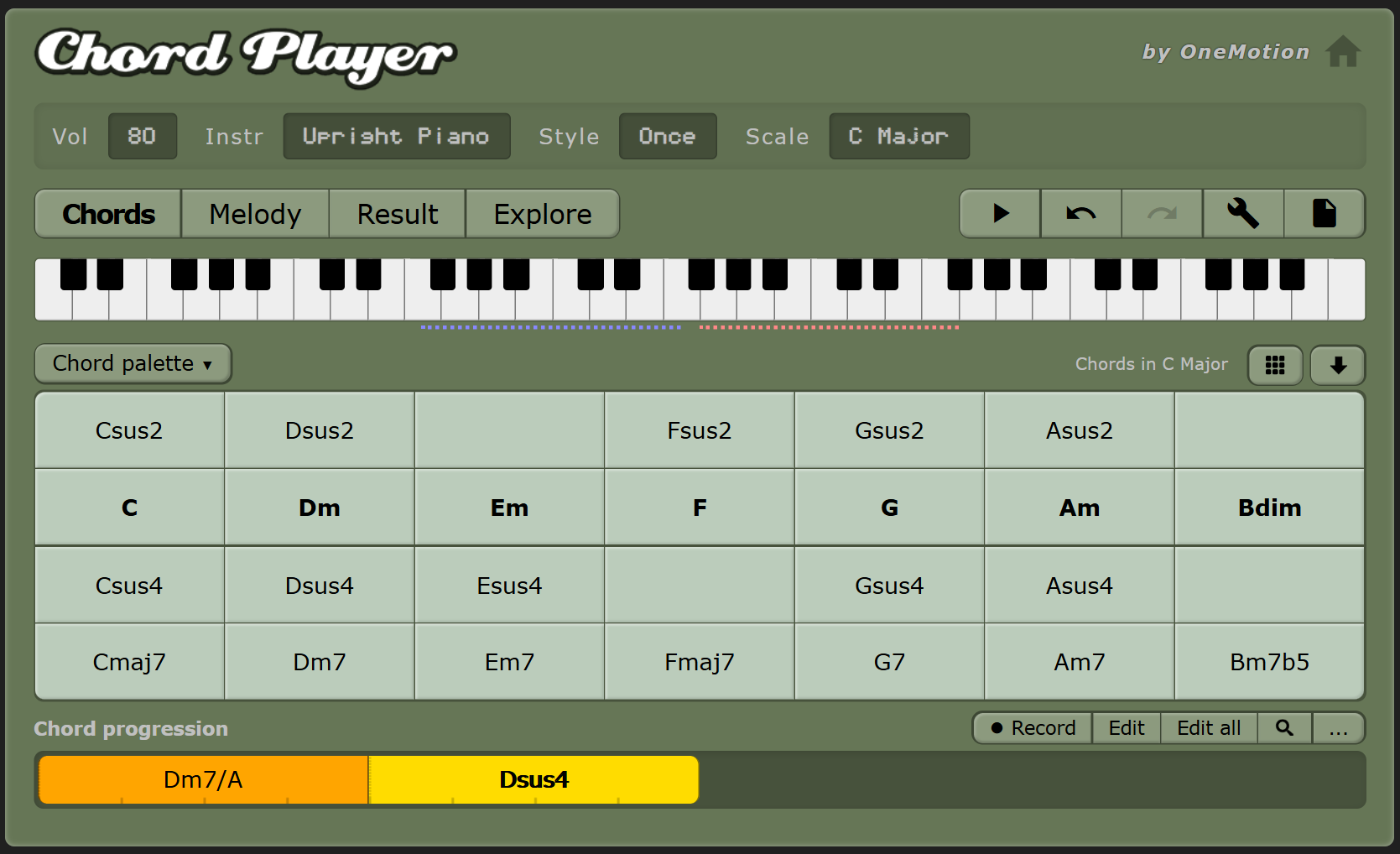
OneMotion Chord Player interface showing chords and scales in the browser

OneMotion Chord Player is a free, browser-based tool that lets you play chords and build simple progressions without installation or an account. You can select a key and scale (chromatic, diatonic, pentatonic, blues), add chord extensions (triads, 7th, Maj7, 9th, Maj9), and hear the results with multiple instrument voices. It also lets you customize bass notes and voicings, which is useful for understanding chord construction.

OneMotion is more of a chord reference and exploration tool than a full progression builder. There's no WAV or MIDI export, and no multi-section arrangement capability. It's fast and visual — good for checking how a chord sounds or exploring what chords fit a scale — but you'll need something else to take the progression into a DAW.

Strengths

  • Completely free, no account
  • Multiple instruments and chord extensions
  • Good for exploring scales and voicings
  • Visual and immediate

Limitations

  • No WAV or MIDI export
  • No rhythm styles or audio playback of progressions
  • Not a full progression builder

Best for: Beginners exploring chord shapes and scales who want an immediate, visual reference without any setup.

#5

Chord Generator by Mario Nieto ↗

Advanced MIDI chord plugin for Mac, Windows, and iPad

€29

DAW Plugin (VST3 / AU / Standalone / AUv3)

Mario Nieto's Chord Generator is a paid DAW plugin (€29) available in VST3, AU, and Standalone formats for macOS and Windows, with AUv3 support for iPadOS at $9.99. It gives you access to 57 scales and modes, advanced voicing control across up to six independent voices, strumming with progressive or randomized note delays, a retrigger mode for chord variations, and MIDI capture and export.

At €29 with a 30-day money-back guarantee and free updates, it's competitively priced for a plugin with this level of control. The voicing and strumming engine is notably more detailed than most chord tools — it's designed for producers who want harmonic depth and rhythmic variation within their DAW, not just chord name suggestions.

Strengths

  • 57 scales and modes
  • Up to 6 independent voice controls
  • Strumming with progressive/randomized delays
  • MIDI capture and export
  • Mac, Windows, and iPad (AUv3)
  • 30-day money-back guarantee

Limitations

  • €29 one-time cost
  • Requires a DAW — not browser-based
  • No AI generation

Best for: Producers who want fine-grained control over chord voicings and strumming patterns directly inside their DAW.

#6

Cthulhu by Xfer Records ↗

Best DAW plugin for chord memory and arpeggio generation

$39

DAW Plugin (VST / AU / AAX)

Cthulhu by Xfer Records is a MIDI FX plugin ($39) that combines a chord memorizer with an advanced arpeggiator. Its core idea is simple: you record or import a set of chords, assign them to keys, and then trigger complex chord voicings with a single keystroke. It ships with over 150 factory chord presets and lets you import any MIDI chord directly — so you can capture a progression from any source and turn it into a playable chord pad.

The arp module is where Cthulhu separates itself from standard chord tools. An 8-tab step sequencer lets you create polymetric patterns — each tab can have an independent length, so the arp evolves over time rather than looping predictably. Tie notes, program velocity and duration per step, and use "intelligent transpose" to keep the pattern diatonic as you change chords. Logic X users get an automatic MIDI FX version that integrates natively. A 15-minute demo is available before purchase.

Strengths

  • 150+ factory chord presets
  • Import or record any MIDI chord
  • 8-tab polymetric arpeggiator
  • Velocity and duration sequencing per step
  • VST / AU / AAX — Mac and Windows
  • 15-minute free demo available
  • Logic X MIDI FX version included

Limitations

  • $39 one-time cost
  • Requires a DAW — not browser-based
  • No AI generation
  • Focused on chord triggering + arp, not free-form composition

Best for: Producers who want to trigger complex chord voicings live from a MIDI keyboard and generate evolving arpeggios — particularly useful for electronic, pop, and cinematic production.

Which one should you choose?

I want to hear my progressions with a real rhythm — free

Chord Sequence is the only free browser tool with real audio playback across multiple rhythm styles. ChordSeq AI and OneMotion don't play back full progressions with rhythm.

I want AI to generate chord ideas for me — free

ChordSeq AI is the best free option — it uses a neural network to suggest chords based on what you've already written. DBDone AI Chords is also free (60 credits) but requires a DAW plugin.

I need it to work inside my DAW

DBDone AI Chords (free, AI) or Mario Nieto Chord Generator (€29, manual but highly detailed) both run as VST3/AU plugins. Neither requires leaving your DAW.

I need WAV export to use in a DAW — free

Only Chord Sequence exports WAV for free. Build your progression in the browser and drag the WAV directly into Ableton, Logic, or FL Studio.

I'm a beginner learning what chords sound like

OneMotion Chord Player is very approachable — no setup, visual interface, and you can immediately hear how chord shapes work. Chord Sequence's free theory articles are also a good companion.

Frequently asked questions

What is the best free chord progression generator?

Chord Sequence (chordsequence.com) is the most complete free option — it supports 37 chord types, 13 rhythm styles with real audio playback, WAV export, and works in any browser without an account. For AI-generated progressions, ChordSeq AI is also free and uses neural networks to suggest chords.

What is the difference between a browser chord generator and a DAW plugin?

A browser-based chord generator (like Chord Sequence, ChordSeq AI, or OneMotion) runs in your web browser with no installation. A DAW plugin (like DBDone AI Chords or Mario Nieto Chord Generator) installs as a VST3, AU, or AAX plugin inside your digital audio workstation (Ableton, Logic, FL Studio, etc.). Plugins integrate directly into your production workflow but require a DAW and installation.

Which chord progression generator is best for learning music theory?

Chord Sequence is built with music theory education in mind — it comes with free theory articles, an interactive circle of fifths, key detector, and chord transposer. You can hear any progression in real time across 13 rhythm styles, which accelerates understanding of how chords sound in context.

Build your first progression now

Chord Sequence is free, requires no account, and works in any browser. 37 chord types, real rhythm audio, WAV export.

Open Chord Sequence →

No account · No credit card · Works offline