Free Online Tool
Bass Tab Creator & Player
Play, learn, and create 4-string bass tabs in your browser — no install, no account. Load Beat It below and hit play right now.
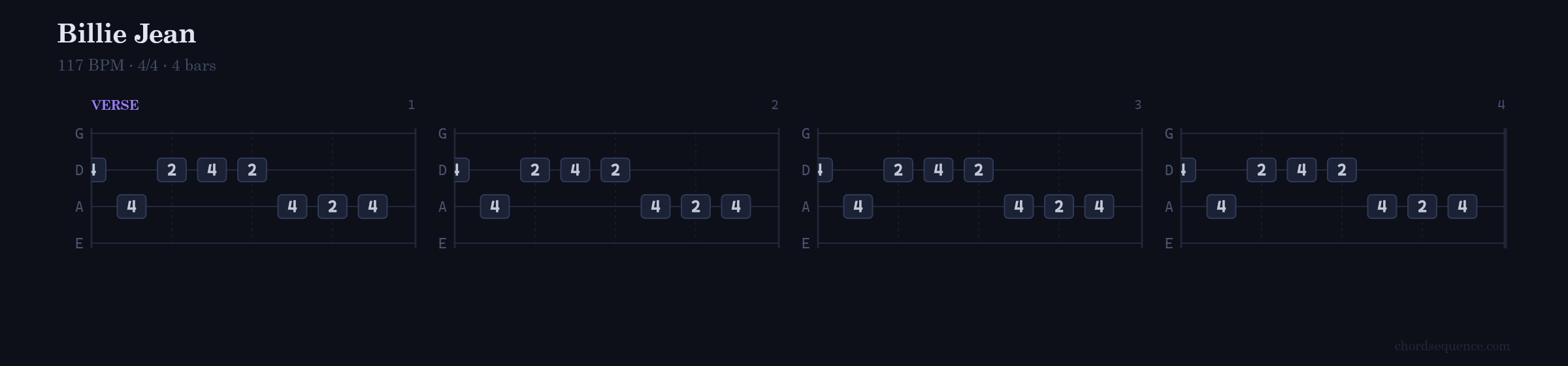
Billie Jean — Michael Jackson · 117 BPM
Everything you need to learn bass
Built for bassists of all levels — from beginners reading their first tab to players who want to transcribe their own lines.
Real-time playback
Hit play and hear your bass line instantly. Adjust BPM on the fly without stopping.
Three views
Switch between Tab notation, Grid editor, and a realistic Bass Guitar visual — all synced.
Drag & resize notes
Draw notes with a click, drag to move, resize to change duration. No typing required.
Multiple sounds
Electric, acoustic, slap bass — choose the tone that fits your song.
10+ preset songs
Load Billie Jean, Beat It, Thriller, and more in one click to study the basslines.
MIDI import
Drag and drop any .mid file onto the editor and it converts to a bass tab instantly — ready to play and edit.
Export & share
Copy as ASCII tab, export to MIDI, or share via a URL link. No account needed.
Songs included
Load any of these songs with one click inside the editor. Accurate fret positions and BPM.
Billie Jean
Michael Jackson · Funk / Pop
Beat It
Michael Jackson · Pop / Rock
Thriller
Michael Jackson · Pop / R&B
Don't Stop 'Til You Get Enough
Michael Jackson · Disco Funk
Smooth Criminal
Michael Jackson · Pop / R&B
Off the Wall
Michael Jackson · Funk / Soul
Wanna Be Startin' Somethin'
Michael Jackson · Funk / Pop
The Way You Make Me Feel
Michael Jackson · Funk / R&B
I Want You Back
The Jackson 5 · Funk / Soul
Le Freak
Chic · Disco Funk
Complete Guide
How to Read Bass Tabs
Bass tablature (tab) is the fastest way to learn a song on bass guitar. No music theory, no sheet music — just four lines, some numbers, and you're playing. Everything below has live interactive examples you can play right on this page.
1. What Is a Bass Tab? The Quick Answer
A bass tab (short for tablature) is a simplified way of writing bass guitar music. Instead of reading traditional sheet music with note values on a staff, you see four horizontal lines representing the four strings of your bass, with numbers showing exactly which fret to press.
Tabs have existed in some form since the Renaissance — lute players used them centuries ago. For bass guitar, they became the standard shorthand among musicians long before the internet, and today they're how millions of players learn songs every day.
Beat It — Michael Jackson
Opening bassline · Electric bass
Bass tab vs. sheet music — at a glance
| Bass Tab | Sheet Music |
|---|---|
| 4 lines (one per string) | 5-line staff |
| Fret numbers | Note heads, accidentals |
| No music theory needed | Requires music literacy |
| Rhythm often approximate | Precise rhythmic notation |
Tabs trade rhythmic precision for accessibility. You learn where to play instantly; the timing comes from listening to the song. That trade-off is why tabs are the go-to format for bass learners worldwide.
2. The 4 String Lines Explained
Every bass tab has four horizontal lines. Each line is a string. Read the tab exactly like you read text: left to right, from top line to bottom if you want to play each string individually.
Standard 4-string bass tuning (GDAE)
| Position | String | Note (open) | Character |
|---|---|---|---|
| Top line | G | G2 | Thinnest string, highest pitch |
| Line 2 | D | D2 | Mid-high |
| Line 3 | A | A1 | Mid-low |
| Bottom line | E | E1 | Thickest string, lowest pitch |
Why is the G string on top?
In standard music notation, higher pitches are written higher on the page. The G string is the highest-pitched bass string, so it sits at the top of the tab. This can feel counterintuitive — when you hold your bass, the E string (thickest) is actually closest to your face and the G string is furthest away. Tab notation flips that perspective.
With a few minutes of practice, your brain maps the lines to the strings automatically. Most bassists stop thinking about it entirely after their first few songs.
3. Fret Numbers — What Each Number Means
The numbers on each string line tell you which fret to press with your fretting hand. The fret is the metal strip on the neck closest to the headstock that produces that note. Count frets from the nut (headstock end): fret 1 is closest to the headstock, fret 12 is an octave up.
0 = Open string (no fret pressed)
A 0 means pluck the string without pressing any fret. Each open string has a specific note: G (G2), D (D2), A (A1), E (E1). Open strings are some of the most powerful tools in bass playing — they ring freely and give the bass its distinctive deep resonance.
→ Play A string fret 2, then G string frets 0 → 2 → 4, then D string open
→ E string is silent the whole time (dashes only)
Frets above 12
Frets 12 and above are common in bass playing. Fret 12 on any string is exactly one octave higher than the open string. A number like 14 on the G string means press the 14th fret of the G string — the note G3. Two-digit numbers are written the same way as single-digit ones; nothing special about them.
Numbers stacked vertically
When two or more fret numbers appear in the same horizontal position (stacked), they're played simultaneously. This is less common on bass than guitar, but happens in chord tones and double-stop passages.
Try it → Beat It shows fret movement across multiple strings
Beat It — Michael Jackson · 138 BPM
4. How to Follow the Beat in a Bass Tab
Reading what to play is step one. Reading when to play it is step two — and for many beginners, the harder step.
In traditional ASCII tabs, spacing between numbers loosely suggests timing, but it's approximate at best. You generally can't tell a quarter note from an eighth note just by looking at the dashes. The most reliable approach: listen while reading. Play the song at reduced speed and match what you see to what you hear.
Bar lines and beat divisions
Most tabs include bar (measure) dividers — vertical lines that mark the end of each bar. In 4/4 time (the most common), each bar holds four beats. Knowing where the bar lines are helps you count and stay in time with the song.
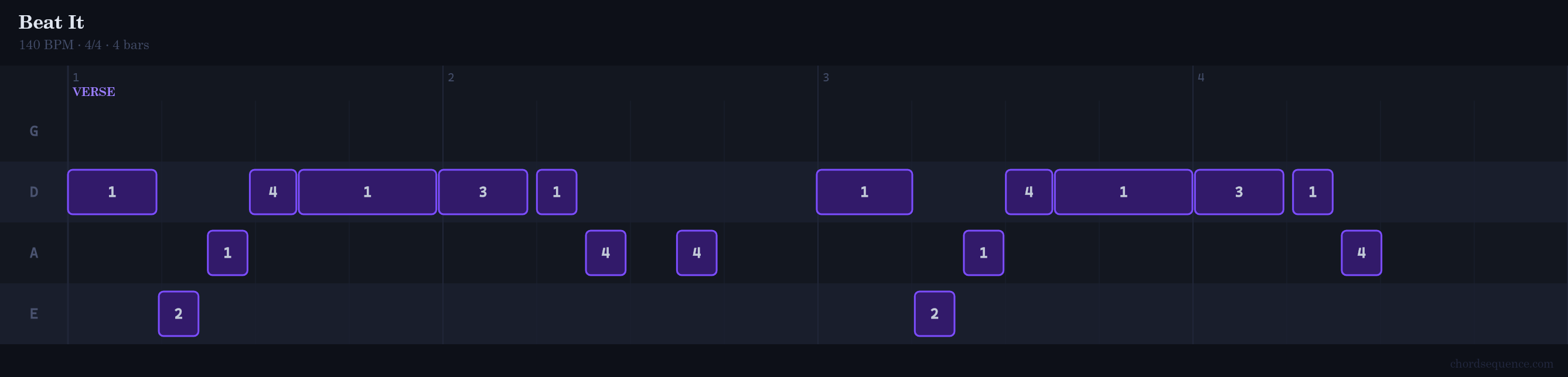
Interactive tab players like the one on this page go further: they show the exact duration of each note as a colored block, and the playhead moves in sync with the audio. This visual rhythm display makes it easy to see whether a note lasts a full beat, half a beat, or a quarter beat — no ear training required.
5. Common Bass Tab Symbols
Beyond fret numbers, ASCII tabs use letter codes for playing techniques. These don't change what note you play, but how you play it. Knowing them unlocks the full expressive vocabulary of the bass.
| Symbol | Technique | Example |
|---|---|---|
| h | Hammer-on | 5h7 |
| p | Pull-off | 7p5 |
| / | Slide up | 5/7 |
| \ | Slide down | 7\5 |
| ~ | Vibrato | 5~ |
| b | Bend | 5b7 |
| x | Dead note | x |
| PM- | Palm mute | PM-- |
These symbols are most common in ASCII tab notation shared online. When you use an interactive editor like the one on this page, the timing and technique info is embedded in the playback — you hear the groove directly rather than decoding symbols.
6. Three Basslines to Practice Right Now
Theory is useful. Playing is better. Here are three basslines arranged by difficulty, each with an interactive player so you can hear the groove before you pick up your bass.
Billie Jean — Michael Jackson
The bassline by session legend Nathan Watts is perfect for beginners. It repeats throughout the entire song with minimal variation, so once you learn it you can play for four minutes straight. The pattern lives mostly on the A and D strings with a handful of notes on G — no big stretches, no fast runs.
- 117 BPM — moderate tempo, comfortable to practice slowly
- Frets 1–7 only — stays in first position
- Repeating pattern — memorize once, play forever
Already playing above — scroll to the top of the page to hear it.
Beat It — Michael Jackson
The Beat It bassline covers more of the neck and requires you to cross strings more frequently. It's great for building fret-hand independence — you'll need to jump between strings quickly while maintaining a steady groove.
- 138 BPM — faster, requires cleaner technique
- Uses all 4 strings actively
- Root-fifth motion — a core bass vocabulary pattern
Already played above in section 3 — scroll up to hear it.
Le Freak — Chic
Bernard Edwards' bassline on Le Freak is a masterclass in syncopation — notes that land between the beats rather than on them. Reading it in tab form is your first real test of understanding rhythm in tablature. The Piano Roll view below makes the syncopated pattern easy to see.
- 116 BPM — moderate, but the syncopation demands focus
- Disco groove — heavily syncopated feel
- E and A strings dominate — low and punchy

7. Tab vs. Standard Notation: Which Should You Learn?
Short answer: learn both eventually, but start with tabs.
Tabs get you playing songs immediately. Standard notation teaches you to understand music as a universal language — you can read a part written by any composer, communicate with musicians who play any instrument, and study from classical and jazz literature.
Most working bassists use tabs for learning songs quickly and standard notation for session work, formal study, or classical/jazz reading. The two complement each other.
The editor on this page shows both simultaneously: the scrolling tab stave sits alongside standard notation so you can start learning what each note looks like in formal notation while you play from tabs.
8. Five Tips to Read Bass Tabs Faster
- 1
Listen first, then read
Play the original song two or three times before looking at the tab. Your ear learns the rhythm so your eyes don't have to figure it out alone. When you open the tab, you're matching what you already know to what you see.
- 2
Use a tab player, not a static image
A tab that moves with the audio (like the interactive examples on this page) communicates rhythm that static notation can't. Watch the playhead and let your hands follow it.
- 3
Learn one bar at a time
Don't try to read the whole bassline at once. Isolate one bar, get it under your fingers at half speed, then move to the next. Speed comes after accuracy.
- 4
Mark the string transitions
When a line of notes jumps from one string to another, that's where most beginners lose their place. Circle or highlight those transitions in a printed tab so your eye knows what's coming.
- 5
Practice reading without the bass first
Tap the rhythm on a table while reading. Once you can tap the rhythm accurately, picking up the bass is much easier — your hands are doing one thing at a time.
Frequently asked questions
Is this bass tab player free?
Yes, completely free. No account required. Open it in any modern browser on desktop or mobile.
What do the numbers mean in a bass tab?
Each number tells you which fret to press on that string. A 0 means you play the string open — without pressing any fret. A 5 on the A string means press fret 5 on the A string.
Which string is on top in a bass tab?
The G string (thinnest, highest pitch) is shown at the top of a bass tab. Below it are D, A, and E (thickest, lowest pitch) at the bottom. This is the opposite of how a bass looks held in playing position, but it matches standard music notation convention.
What does 0 mean in a bass tab?
0 means "open string" — pluck the string without pressing any fret. It produces the string's natural note: G2, D2, A1, or E1 depending on the string.
Do bass tabs show rhythm and timing?
Traditional ASCII bass tabs show only which notes to play, not their exact durations. You need to listen to the original song or use an interactive tab player to understand the rhythm. This editor shows note durations visually, so you don't have to guess.
What is the difference between guitar tabs and bass tabs?
Guitar tabs have 6 lines (one per string), while bass tabs have 4 lines. Bass tabs are also read an octave lower than written. The principles of reading — strings as lines, fret numbers — are identical.
What does "h" mean in a bass tab?
"h" stands for hammer-on. Written as 5h7, it means you pluck the string at fret 5, then "hammer" your finger onto fret 7 without plucking again. The second note is produced by the fretting action alone.
What does "/" mean in a bass tab?
"/" means a slide up. Written as 5/7, it means you play fret 5 and slide your finger up to fret 7 while keeping pressure on the string. "\" is a slide down.
Can I create my own bass tabs?
Yes. Use the Grid editor to draw notes on any string and fret, set the duration, and adjust BPM. You can export as ASCII tab or MIDI, or share your tab via a URL — all free, no account needed.
Can I import a MIDI file?
Yes. Drag and drop a .mid or .midi file onto the editor and it automatically converts to a bass tab — fret positions calculated, BPM preserved. From there you can play it back, edit notes, or export it as ASCII tab.
Are bass tabs accurate?
Tab accuracy varies by source. Tabs created by skilled transcribers or pulled from official sheet music are very accurate. User-submitted tabs can have mistakes, especially in fret positions across strings. Always verify with your ear.
What songs are included?
The player ships with 10 preset songs including Billie Jean, Beat It, Thriller, Le Freak, and more — all with accurate fret positions and BPM.
What is the best song to learn first with bass tabs?
Billie Jean by Michael Jackson is a classic first choice: the bassline repeats throughout, uses only a few frets, and has a strong groove that's instantly recognizable. You can play along with the interactive preview on this page right now.
Curious how this compares to Guitar Pro, Songsterr, and other bass tab tools? See the full bass tab software comparison →
Related tools
Virtual Bass Guitar
Tap individual notes on a full fretboard with four real sampled sounds.
Online Tuner
Tune your bass before recording. Works via your device microphone.
Metronome
Practice your bass lines with a steady tempo. Tap tempo included.
Drum Machine
Program a 16-step beat to play your bass lines over.
Drum Tab Player
Read and write drum tabs — percussion notation, step grid, or pasted ASCII tab.
Guitar Strumming & Arpeggio Player
Edit and play guitar strumming and arpeggio patterns over any chord.
Ready to play?
Open the full editor and start learning bass lines today. Free, no account needed.
Open Bass Tab Player →