Whether you're transcribing your own basslines or learning someone else's note for note, the right tab tool changes how fast you improve. We compared library size, playback quality, and editing power across the tools bassists actually use — here's where each one wins.
Disclosure: Chord Sequence (#1) is our own tool. All competitor data is sourced from their public websites as of July 2026.
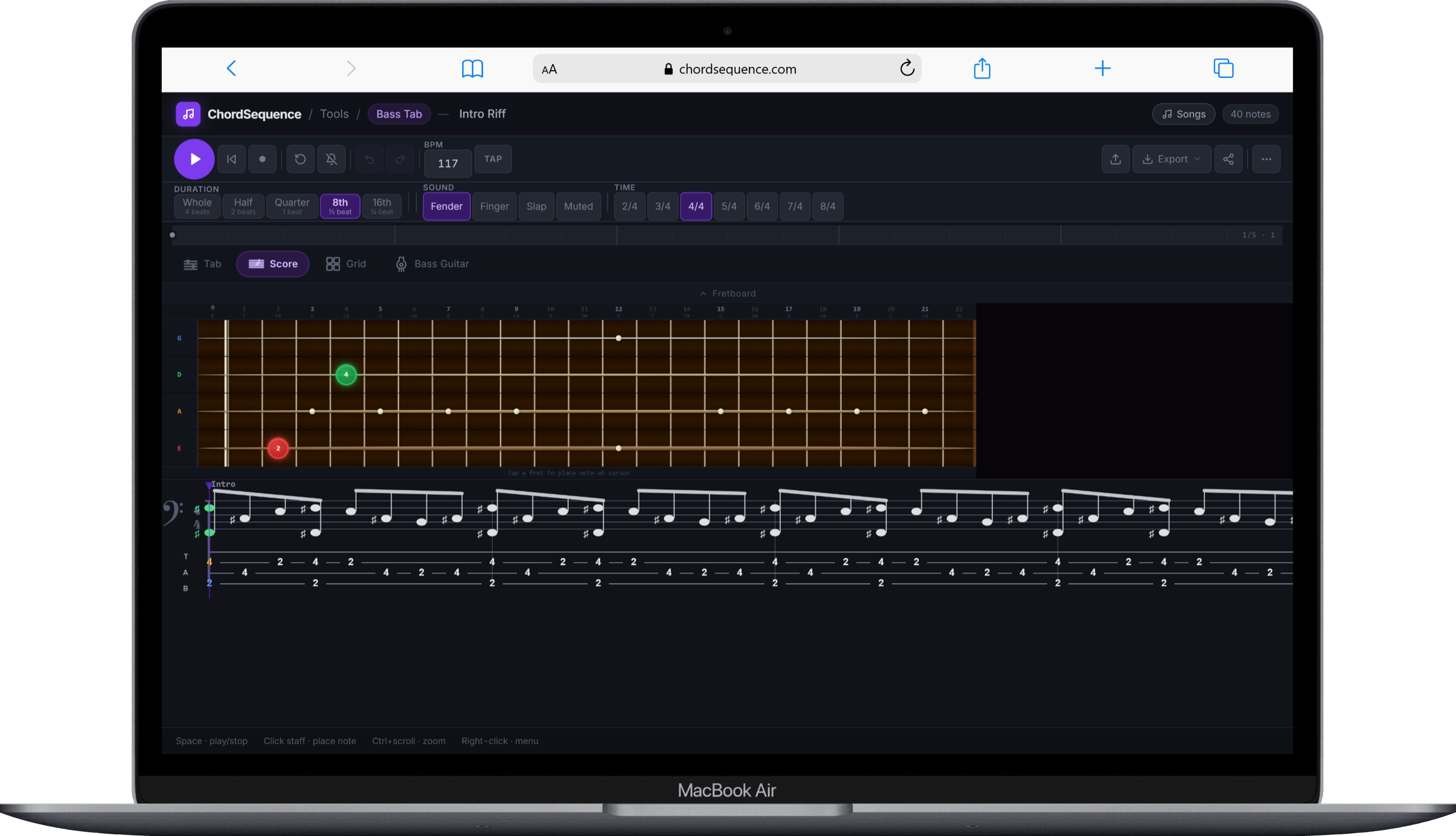
Chord Sequence's Bass Tab Player is a free, browser-based 4-string bass tab editor with a piano-roll style grid synced to an interactive fretboard view — click to place a note, drag it across strings or beats, and resize to change duration, all with real-time playback through a dedicated bass audio engine rather than a generic synth.
Choose between three bass tones — Pick, Synth, and Slap — and use the built-in recording mode to tap out a bassline in real time at a slow practice tempo instead of placing notes one by one; recorded takes are tempo-agnostic, so they play back correctly once you speed the track up to its real BPM.
60-step undo/redo, autosave to your browser, and one-click sharing via a URL round it out — no account needed to use the editor. Export to MIDI, ASCII tab, WAV audio, image, or video, and import an existing MIDI file straight into the editor.
Strengths
✓ Free, no account, works in any modern browser
✓ Piano-roll grid synced to a real fretboard view
✓ Real bass audio engine — Pick, Synth, and Slap tones
✓ Recording mode: tap out a bassline at a slow practice tempo
✓ 60-step undo/redo, autosave, and share via URL
✓ Exports to MIDI, ASCII tab, WAV, image, and video — plus MIDI import
Limitations
– No pre-built song library the size of Ultimate Guitar's or Songsterr's
– No offline desktop app — requires a browser
– Does not export to the Guitar Pro (.gp) file format
Best for: Bassists who want to sketch, record, and share a bassline quickly in the browser — without installing anything or paying for a subscription.
The professional standard for tabbing bass — and everything else
$69.99 one-time
Win · Mac · Mobile
Guitar Pro 8 is the industry-standard tab editor, and its bass support runs just as deep as its guitar support: notation for slap, pop, hammer-ons, pull-offs, slides, bends, palm muting, and ghost notes, with configurable tunings from 4 up to 10-string basses.
You can import an audio file directly into your workspace and transcribe a bassline by ear alongside the waveform — genuinely useful for working out a real recording note-for-note. Playback runs through 100+ realistic instrument sounds and a full effects/pedal chain.
The optional mySongBook library (around €40 for 12 months) adds official, ready-made tabs, but the core editor is a one-time purchase — no recurring subscription required to keep using it.
The smoothest way to learn an existing bassline by ear and eye
Free · Plus $9.99/mo
Web · iOS · Android
Songsterr is built around an enormous, community-sourced tab library, and every song plays back as synced, multi-track audio — the bass line is highlighted separately from guitar, drums, and vocals as the song plays, which makes following a real bass part far easier than reading a static tab.
The free tier covers browsing and basic playback. Songsterr Plus, at $9.99/month, unlocks playback speed control without changing pitch, looping, muting or soloing individual tracks (isolate just the bass), downloads in MIDI/Guitar Pro/MP3/WAV, and AI transcription of up to 50 tabs a month from a YouTube link.
It isn't built for writing your own tab from scratch — Songsterr is a player first, an editor a distant second.
Strengths
✓ Massive, community-sourced tab library
✓ Synced multi-track playback — isolate the bass track and follow along
✓ Playback speed control and looping (Plus)
✓ AI transcription from YouTube links, 50/month (Plus)
✓ Web, iOS, and Android apps
Limitations
– Core practice features (speed, loop, mute/solo) require Plus at $9.99/mo
– Not designed for writing your own bass tab
– Ads on the free tier
Best for: Bassists who want to learn an existing song from a huge, ready-made library with synced audio — not to write their own tab.
The biggest tab catalog, official multi-instrument versions included
Free (basic) · Pro $99/yr
Web · iOS · Android
Ultimate Guitar's library is the largest in this comparison — over 800,000 songs across guitar, bass, and ukulele. Many songs include official Pro tabs with multiple instrument parts transcribed together (bass, guitar, vocals, drums), so you can see exactly how the bass line locks in with the rest of the arrangement.
The free tier lets you browse and view basic community-submitted chord sheets and tabs. Interactive playback, the fretboard view, and the official multi-instrument Pro tabs sit behind the Pro subscription — around $99/year or $25/month, with pricing varying by region.
Editing tools are minimal — Ultimate Guitar is built for finding and playing existing tabs, not composing your own from scratch.
Strengths
✓ Largest tab catalog in this comparison — 800,000+ songs
✓ Official Pro tabs include multiple instrument parts, bass included
✓ Fretboard view for following along
✓ Web, iOS, and Android apps
Limitations
– Interactive playback and official tabs require Pro (~$99/yr or $25/mo)
– Minimal editing tools — not built for writing your own tab
– Ads on the free tier
Best for: Bassists who mainly want to find and play an existing song's bass part from the biggest tab catalog around.
The best free desktop notation software with proper bass tab support
Free · open source
Win · Mac · Linux
MuseScore Studio is free, open-source notation software (GPL license) that happens to handle bass tablature very well. Selecting Electric Bass (or another bass instrument) from the instrument list gives you a proper tab staff, and a linked-staff system lets you view and edit standard notation and tablature side by side — edit one, the other updates automatically.
It's the only permanently free tool in this comparison with real desktop editing power on Windows, macOS, and Linux — the closest thing to a free Guitar Pro alternative that's actively maintained. MIDI input and MusicXML/MIDI import-export make it easy to move work in and out of other software.
The trade-off is a steeper learning curve than a purpose-built bass tab tool — MuseScore is full notation software first, and bass tab is one thing it happens to do well, not its sole focus.
Chord Sequence takes the crown in 2026: it does what most bassists actually need — write a tab, hear it played back with a real bass engine, see it on a fretboard — free, in the browser, with zero setup. Guitar Pro 8 remains the pro editor if you transcribe heavily, Songsterr is the smoothest player for learning songs, and Ultimate Guitar keeps the deepest catalog.
Which one should you choose?
I want to write and record my own bassline for free, no install
Chord Sequence is the fastest browser-based option — a piano-roll editor synced to a fretboard, real bass tones, and a recording mode for tapping out ideas at a slow tempo.
I need the deepest editing tools and don't mind paying once
Guitar Pro 8 covers every bass articulation (slap, pop, bends, ghost notes) and can transcribe alongside an imported audio file — the most complete toolkit here for a one-time $69.99.
I just want to learn an existing song's bass part, not write my own
Songsterr is built for exactly this — synced multi-track playback lets you isolate the bass line and follow along in real time. Its free tier covers browsing and playback; Plus ($9.99/mo) unlocks loop and speed control.
I want the biggest possible tab catalog
Ultimate Guitar's library is the largest here at 800,000+ songs, with official Pro tabs that include a full multi-instrument breakdown — bass included.
I need a real, free desktop editor with proper notation
MuseScore Studio is the right tool — completely free and open source, with linked standard notation and tab staves on Windows, macOS, and Linux.
Frequently asked questions
What is the best free bass tab maker?
Chord Sequence (chordsequence.com/tools/bass-guitar-tab/) is the best free option for writing your own bass tab — no install, no account, a piano-roll editor synced to a real fretboard, three bass tones (Pick, Synth, Slap), a recording mode, and exports to MIDI, ASCII, WAV, image, or video. If you specifically need a free permanent desktop app with full notation support, MuseScore Studio is the best choice.
What is the difference between a bass tab maker and a bass tab player?
A bass tab maker (like Chord Sequence, Guitar Pro, or MuseScore Studio) lets you write and edit your own tablature from scratch. A bass tab player (like Songsterr or Ultimate Guitar) is built around an existing library — you search for a song and play back a tab someone else already transcribed, rather than writing your own.
Which bass tab software is best for beginners?
Chord Sequence is the most approachable for beginners learning to write their own bass lines — it runs in any browser, has real audio playback so you can hear exactly what you write, and a recording mode that lets you tap out a line at a slow tempo instead of clicking notes one by one. Songsterr is a good complement if you mainly want to learn existing songs by ear.
Can I read bass tabs without downloading any software?
Yes. Chord Sequence, Songsterr, and Ultimate Guitar all work entirely in a web browser with no install. Guitar Pro 8 and MuseScore Studio require a desktop install, though MuseScore is free and Guitar Pro offers a free trial.
Create your first bass tab now
Chord Sequence's Bass Tab Player is free, requires no account, and works in any browser. Piano-roll editing, real fretboard view, Pick/Synth/Slap tones, recording mode, MIDI/ASCII/WAV export.