Chord Player vs Chordbot
A free Chordbot alternative, with intros, fills and a rhythm editor.
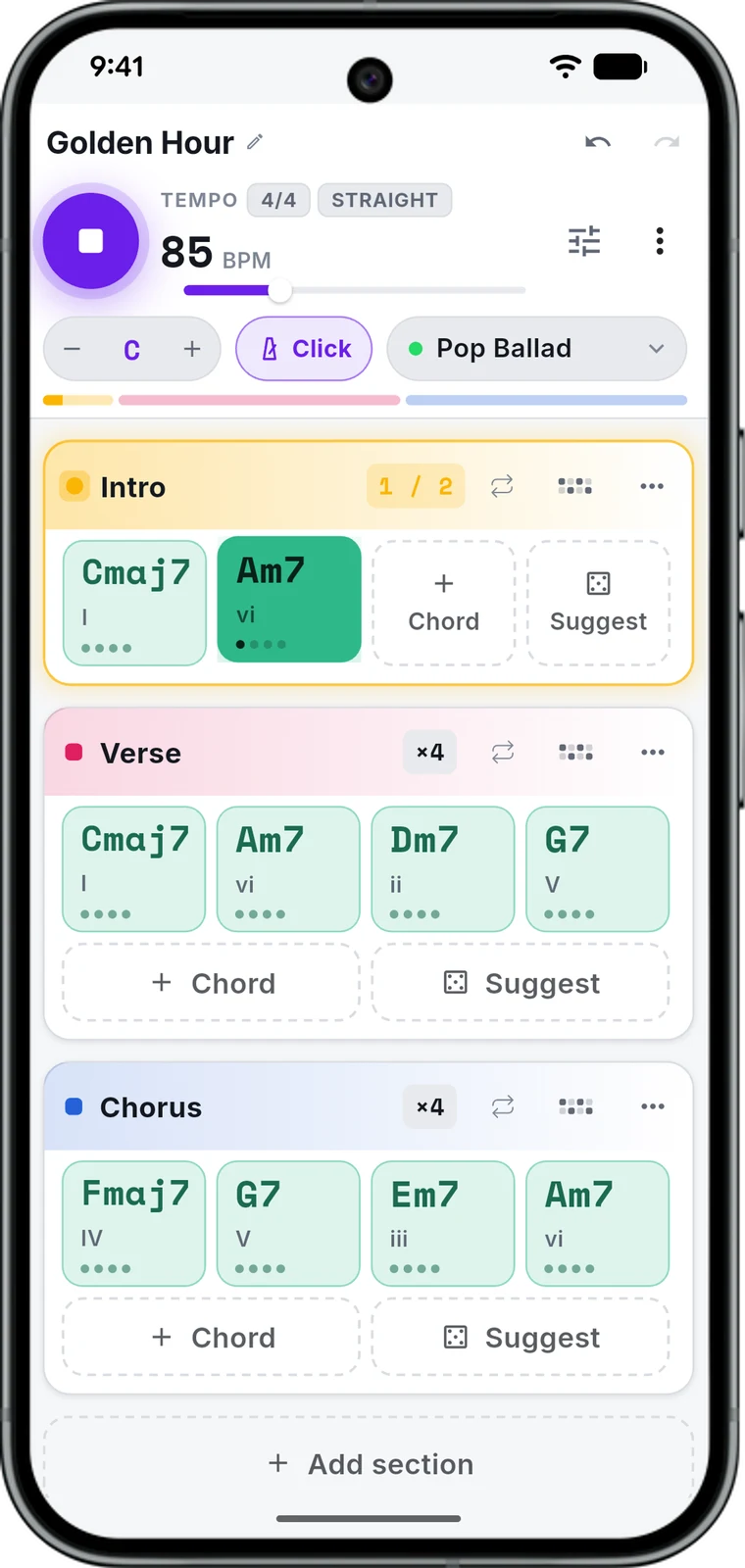
Type the chords, pick one of 545 rhythms, and drums, bass, piano, guitar and synth play them, on iPhone, Android or in the browser. Free, and it saves and exports. It also has what Chordbot’s own FAQ still lists as planned: intros, endings and fills, a pattern editor and a web version.


Every figure about Chordbot below is from Contrasonic AB’s own pages and store listings, read on 26 October 2026. Sources.
The short answer
Pick Chord Player if
- You want to save and export without paying for a Pro version
- You want intros, endings and fills, and to edit the patterns step by step
- You play Latin, worship or gospel and want those grooves ready to use
- You want it on a computer too, in the browser
Stay with Chordbot if
- You need more chord types (60+) and control over every inversion
- You want a whole song generated at the tap of a button (Song-O-Matic)
- You already keep your songs in Chordbot and like it as it is
Side by side
Chord Player and Chordbot, point by point.
 Chord Player | Chordbot | |
|---|---|---|
| Price | Free, with saving and export | Lite free, without saving or export; Pro $4.99 on each store |
| Phones | iPhone (iOS 15.0+) and Android (8.0+) | iPhone and iPad (iOS 12+) and Android; a licence does not move between stores |
| Computer | Runs in any browser: nothing to install | None; web and desktop versions are listed as planned |
| Last update | October 2026, on both stores | May 2022 on the App Store, November 2022 on Google Play |
| Styles | 545 rhythms | 70+ comping presets, built from 400+ instrument tracks you can mix |
| Intros, endings, fills | On nearly every rhythm; a fill when you call it | Listed as planned in its FAQ |
| Edit the patterns | Every step of every instrument, bar by bar | A style/pattern editor is listed as planned |
| Chords | 39 chord types, slash bass notes, half-beat chords | 60+ chord types in every inversion, with an inversion selector |
| Writing help | Suggest: a progression that fits your key | Song-O-Matic: a whole song, with pop, jazz and experimental profiles |
| Sounds | GeneralUser GS samples: 261 sounds, 16 drum kits | GeneralUser GS samples, the same set |
| Mixer | Level, pan, mute, solo, 3-band EQ and compression per instrument; reverb on the mix | Mix the instrument tracks, with separate settings per section |
| Export | M4A, WAV, MIDI | MIDI and WAV, in Pro only |
Price
Phones
Computer
Last update
Styles
Intros, endings, fills
Edit the patterns
Chords
Writing help
Sounds
Mixer
Export
marks the one ahead on that row, where one is. Chordbot’s figures as of 26 October 2026.
Where Chordbot wins
What it does that Chord Player doesn’t.
More chords, more control
Over 60 chord types, every one in every inversion, chosen for you or by hand. Chord Player has 39 types and slash bass notes, and picks the voicing itself.
A song from one button
Song-O-Matic writes a whole song in a pop, jazz or experimental profile. Chord Player’s Suggest offers a progression in your key; building the song is up to you.
Small, and well liked
About 19 MB on the iPhone, around since 2010, with over a million downloads of Chordbot Lite on Google Play and a 4.5 rating from 3,250 reviews of the Pro version there.
Where Chord Player wins
A backing band made for the phone.
Save and export, free
Chordbot Lite plays but cannot save or export; that takes Pro, bought separately on each store. In Chord Player saving, M4A, WAV and MIDI are free on iPhone, Android and the browser.
What Chordbot lists as planned, already here
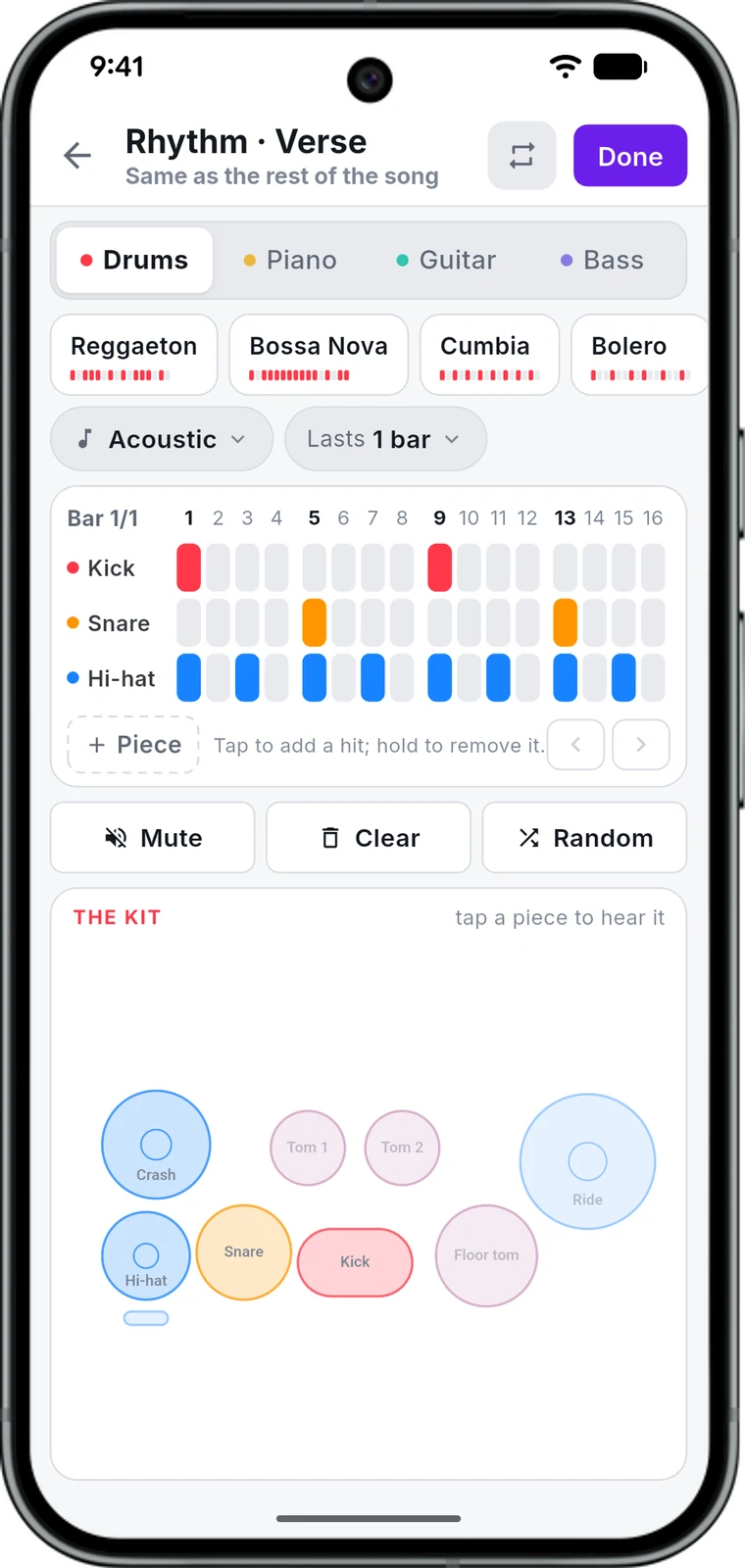
Intros, endings and fills on nearly every rhythm, and an editor for every step of every instrument. Chordbot’s FAQ lists both as planned features, with no date.
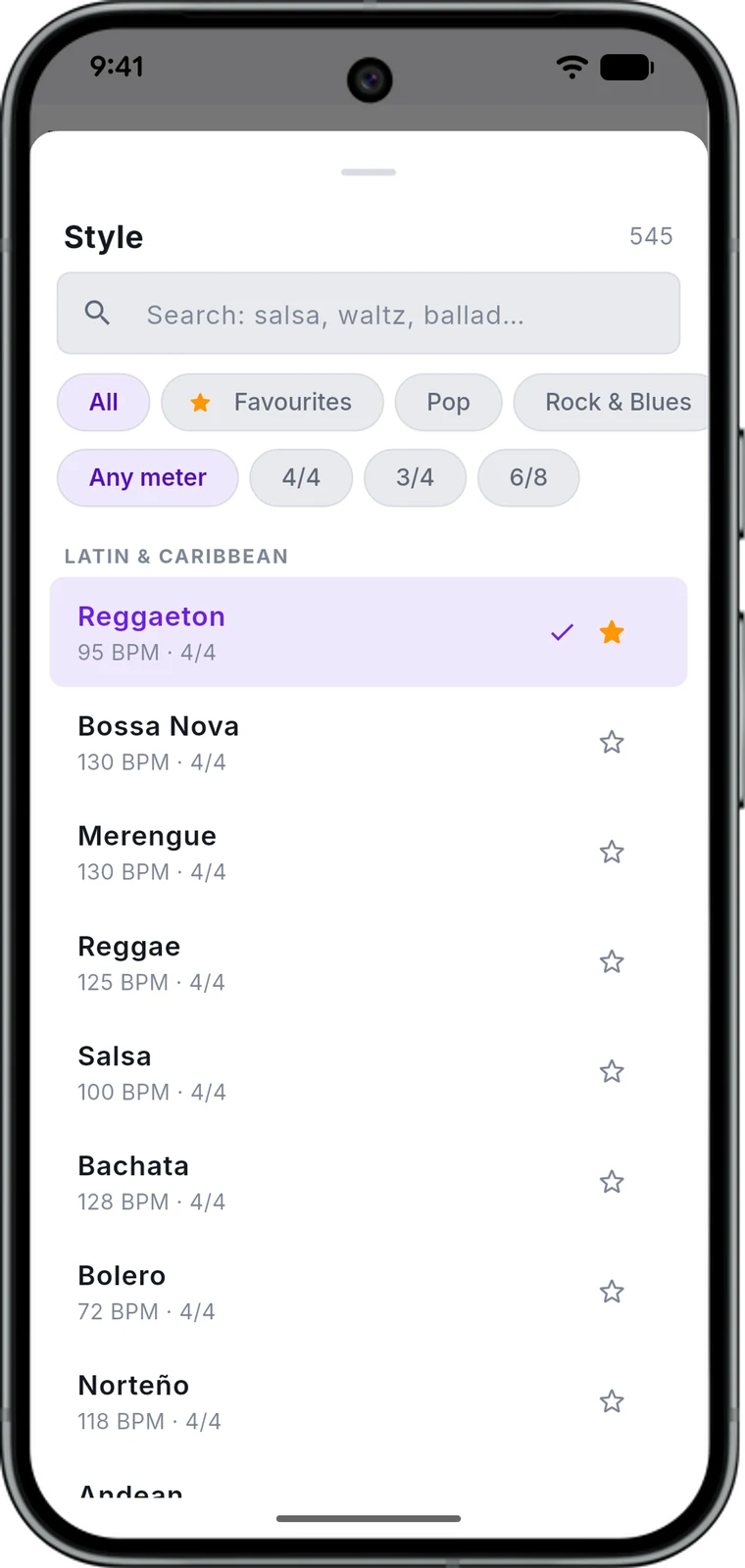
545 rhythms, sorted and searchable
Cumbia, bachata, vallenato, norteño, salsa, worship, gospel, pop, rock, funk and jazz, with the hand percussion the Latin ones need, favourites starred.
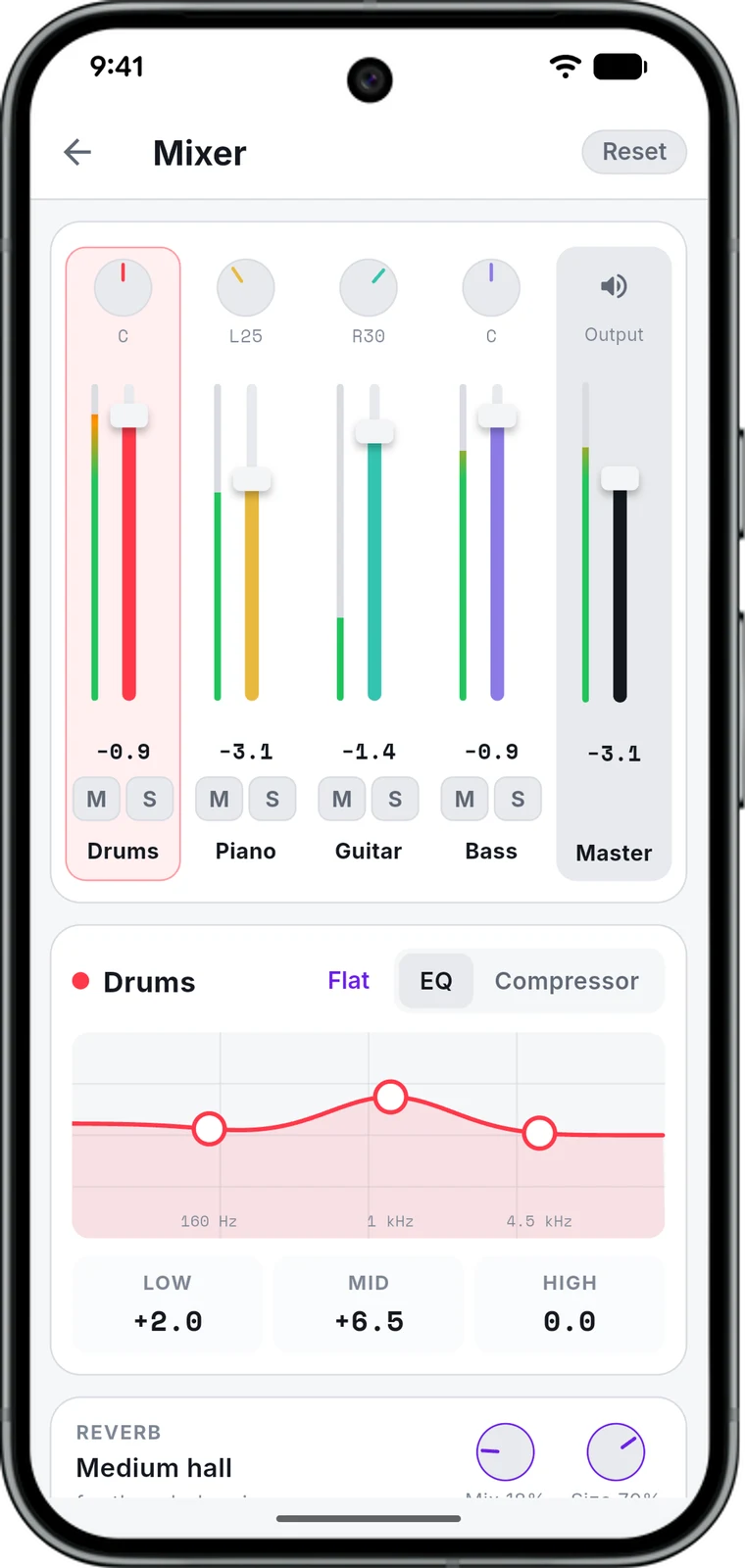
Mix it like a band
A fader, pan, mute and solo for every instrument, a three-band EQ and compression on each, and reverb on the mix.
Switching
Coming from Chordbot
- 1 Chord Player cannot open Chordbot’s JSON song files. You bring a song over by typing its chords: one section at a time, a chord per tap, its length on a slider.
- 2 Give each section the rhythm closest to the preset you used, and pick its part: intro, A, B or ending.
- 3 Set the key and the tempo. Need it in your DAW? Export MIDI for the notes or WAV for the audio.
What carries over is the song: chords, sections, key and tempo. Chordbot’s inversions and its per-section mixes do not.
Questions
Before you switch
Is Chordbot still updated?
Its last updates are from May 2022 on the App Store and November 2022 on Google Play. Its FAQ calls it a one-man, part-time project and lists planned features with no dates.
Is Chord Player free like Chordbot Lite?
Yes, and unlike Lite it saves your songs and exports M4A, WAV and MIDI. There is nothing to buy inside it and no account to make.
Can Chord Player open my Chordbot songs?
No. Chordbot saves songs as JSON files that only it reads. You type the chords in, section by section.
Do they sound different?
Both play samples from the same GeneralUser GS set, so a piano or a bass sounds alike. What differs is the arrangement: the rhythms, the parts and how they are played.
Which one has more chords?
Chordbot: over 60 types in every inversion. Chord Player has 39, with slash bass notes and chords half a beat long.
Try the band before you decide.
Free on the App Store and Google Play. No account, no connection needed.
Sources
Chordbot is a trademark of Contrasonic AB. Its figures were read from these pages on 26 October 2026; prices are in US dollars as Contrasonic AB lists them. Chord Player’s are from its own code.
- Chordbot (Pro) on Google Play: price, features, last update, ratings
- Chordbot Lite on Google Play: what it lacks, downloads, last update
- Chordbot on the App Store: price, size, last update
- Chordbot Lite on the App Store
- chordbot.com: chord types, presets, instrument tracks, export
- chordbot.com: where to get it, and what Lite lacks
- chordbot.com FAQ: import, licences, sample credits, planned features