
Updated July 2026

6 Best Guitar Tab Software in 2026

Whether you want to sketch a riff in the browser, exchange files with other musicians, or engrave a full score, there's a guitar tab tool built for it. This guide covers six of the best options in 2026, ordered free-first — three free browser/desktop tools, one free-tier notation app, and two paid options.

Disclosure: Chord Sequence (#1) is our own tool. All competitor data is sourced from their public websites as of July 2026.

Elías Corsino Saldaña

Musician & Software Developer

Quick summary

  • #1 Chord Sequence — Best free browser tab editor. Drag & resize notes, Chord Helper, capo, imports Guitar Pro files, ASCII/MIDI export. No account.
  • #2 TuxGuitar — Free, open-source desktop editor. Opens Guitar Pro files. Windows, macOS, Linux.
  • #3 Tabby.pro — Free browser tab maker for guitar, bass, ukulele, and mandolin. No account required.
  • #4 Dorico — Free SE tier (8 instruments) up to €579 Pro (crossgrade/upgrade discounts available). Professional notation with tab support.
  • #5 Songsterr — Free tab library, $9.99/mo Plus. Synced multi-track playback for learning existing songs.
  • #6 Guitar Pro 8 — $69.99 one-time. The industry-standard tab editor. 100+ instrument sounds.

Feature comparison

Tool Price Type Platform Audio Export
Chord Sequence Free Browser Any ASCII + MIDI
TuxGuitar Free Desktop Win/Mac/Linux gp3-5 + MIDI
Tabby.pro Free Browser Any
Dorico Free–€579 Desktop Win/Mac MusicXML, MIDI, PDF
Songsterr Free / $9.99mo Web + Mobile Web/iOS/Android ✅ Synced MIDI, GP, MP3, WAV (Plus)
Guitar Pro 8 $69.99 Desktop Win/Mac gp, MIDI, MusicXML, PDF
#1 · Our pick

Chord Sequence Guitar Tab Player

Best free browser-based guitar tab editor

Free forever

Browser tool
1234eBGDAE00335500335500336655003300
Duration
1/4

Smoke on the Water

Deep Purple · 112 BPM

Edit
Chord Sequence Guitar Tab Player showing the notation and tab view with a Chord Helper panel

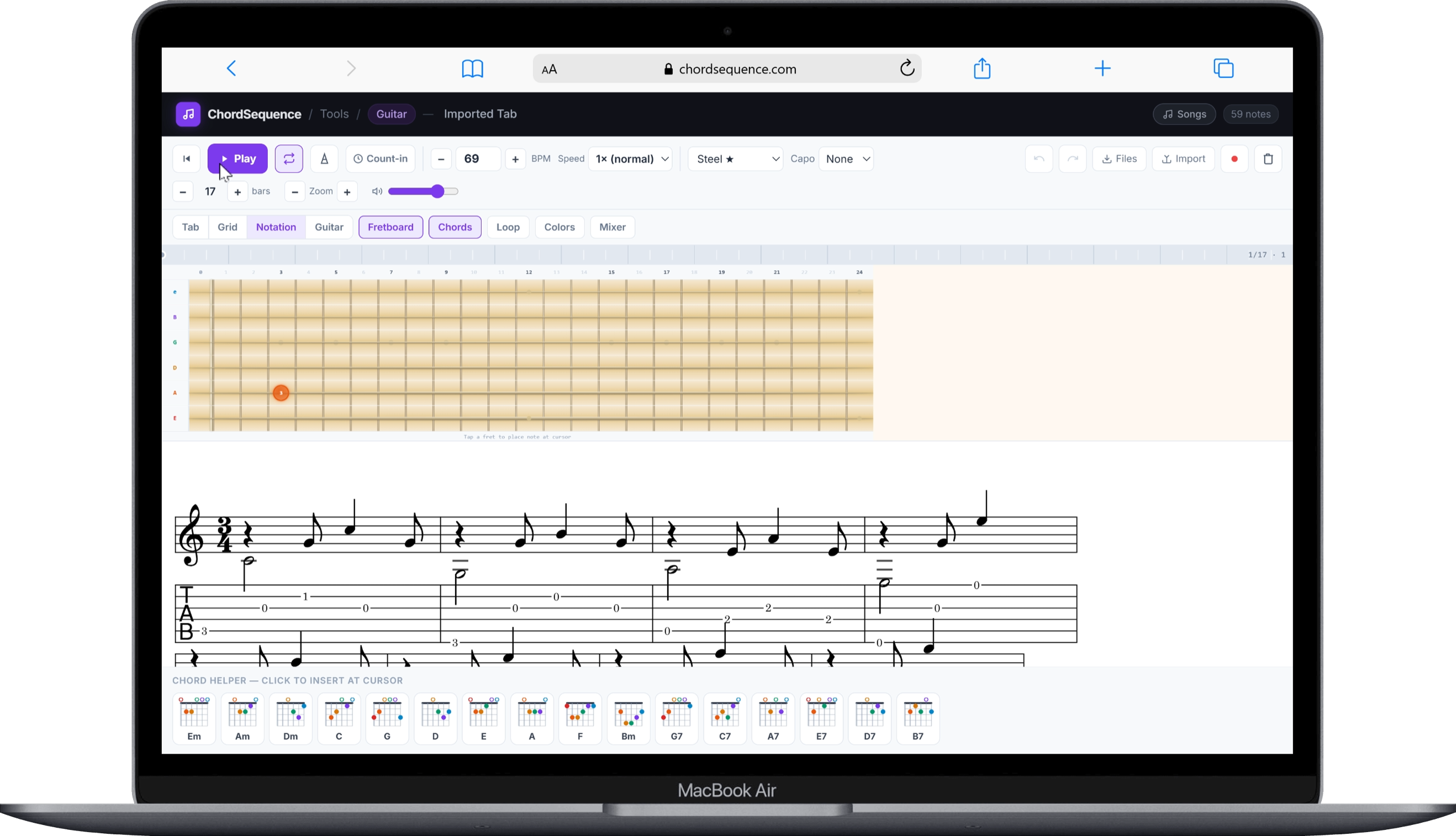
Chord Sequence's Guitar Tab Player is a free, browser-based 6-string tab editor that lets you draw, play, and export guitar tabs without installing anything or creating an account. Click to place notes on any of the six strings, drag to move them across strings or beats, and resize to change duration — all with real-time audio playback so you can hear exactly what you're writing as you go.

A one-click Chord Helper panel inserts full chord shapes (Em, C, G, D, Am, and more) at the cursor position, which makes building chord-based arrangements fast. Capo support automatically transposes playback without changing the fret numbers you see, and you can choose between four tones — Acoustic, Nylon, Clean Electric, and Synth. When you're done, export your tab as ASCII text for sharing on forums, or as MIDI for use in a DAW.

You can also import an existing Guitar Pro file (.gp, .gp3, .gp4, .gp5, .gp7, .gpx) directly in the browser — no desktop install required. The importer reads the file's tracks, tuning, and rhythm and drops it straight into the editor, ready to play, edit, or export.

Strengths

  • Free, no account, works in any modern browser
  • Drag-and-resize note editing with real-time playback
  • One-click Chord Helper for common chord shapes
  • Capo support with automatic playback transposition
  • Four instrument tones — Acoustic, Nylon, Clean, Synth
  • Imports Guitar Pro files (.gp/.gp3/.gp4/.gp5/.gp7/.gpx) — no desktop app needed
  • Export to ASCII tab and MIDI

Limitations

  • No pre-built library of existing songs the size of Songsterr's
  • No offline desktop app — requires a browser
  • Does not export back to the .gp format

Best for: Guitarists who want to sketch, practice, and share a tab quickly in the browser without installing software or paying anything.

#2

TuxGuitar ↗

Best free, permanent desktop alternative to Guitar Pro

Free (open source)

Desktop app (Windows / macOS / Linux)

TuxGuitar is a free, open-source multitrack tablature editor released under the GNU GPL license. It's the closest thing to a truly free, permanent alternative to Guitar Pro: it opens and exports Guitar Pro files (.gp3, .gp4, .gp5) as well as MIDI, and supports both tablature and standard notation side by side. It runs natively on Windows, macOS, and Linux, which makes it the only tool in this list with real Linux support.

Beyond basic tab entry, TuxGuitar includes a built-in MIDI player with adjustable tempo, MIDI keyboard input for composing, and support for guitar articulations like hammer-ons, pull-offs, bends, and slides. Development slowed after the original project's website went down at the end of 2022, but the community picked it back up in a new GitHub repository, so it's still actively maintained.

Strengths

  • Completely free forever, open source (GPL)
  • Runs on Windows, macOS, and Linux
  • Opens and exports Guitar Pro (.gp3/.gp4/.gp5) and MIDI files
  • Multitrack composition with standard notation + tab
  • MIDI keyboard input support

Limitations

  • Dated interface compared to modern browser tools
  • No official mobile app
  • Development pace slowed after 2022 (now community-maintained)

Best for: Linux users, or anyone who wants a free desktop editor that can open and exchange Guitar Pro files with other musicians.

#3

Tabby.pro ↗

Free browser tab maker for guitar, bass, ukulele, and mandolin

Free

Browser tool

TabbyPro is a free, browser-based tab creator that covers more than just guitar — it also supports bass, ukulele, and mandolin from the same interface. No account is required to create and store tabs; the editor saves your work directly in the browser's local storage, with an optional account if you want to access your tabs from another device or share them.

The editor supports capo positioning, time signatures, and common articulations like hammer-ons, pull-offs, bends, slides, and vibrato, alongside a bundled chord library and fretboard trainer. It doesn't play your tab back as audio, and there's no export to ASCII, MIDI, or any other file format — TabbyPro is a visual tab sketchpad, not a playback or export tool.

Strengths

  • Free, no account required to create and edit tabs
  • Supports guitar, bass, ukulele, and mandolin
  • Capo, time signatures, and standard tab articulations
  • Bundled chord library and fretboard trainer

Limitations

  • No audio playback — can't hear your tab
  • No export to ASCII, MIDI, or any other format
  • Less established brand and community than the other tools here
  • Tabs saved to local browser storage by default (account needed for cross-device access)

Best for: Players who want a fast, free, multi-instrument tab sketchpad in the browser without installing anything or making an account.

#4

Dorico ↗

Professional notation software with guitar tab as a secondary feature

SE: Free · Elements: $299.99 · Pro: €579

Desktop notation software (Windows / macOS)

Dorico is Steinberg's professional music notation software, built primarily for composers, arrangers, and publishers producing full scores — not specifically for guitarists sketching riffs. It can display fretted-instrument music as standard notation, tablature, or both linked together, so editing one view automatically updates the other. Dorico 6.2 brought meaningful improvements to guitar tab specifically, including better handling of bends and tied notes and support for European-style guitar notation.

Dorico SE, the free tier, supports up to 8 instruments and includes tablature — genuinely useful for a solo guitar part inside a larger arrangement. Elements ($299.99) and Pro 6 unlock the full engraving toolset for larger, publication-grade scores. Pro 6's full price is €579 (VAT included), but Steinberg discounts it for existing users — €299 as a competitive crossgrade from another notation program, or €99.99/€199 as an update from Dorico 5/4 respectively. If your goal is simply to write down a guitar riff quickly, Dorico is significant overkill; it earns its place here for guitarists who need tab as part of a proper, multi-instrument notated score.

Strengths

  • Free SE tier available (up to 8 instruments, includes tab)
  • Best-in-class notation engraving quality
  • Tab and standard notation linked — edit one, both update
  • Recent updates specifically improved guitar tab notation
  • Discounted crossgrade/upgrade pricing for existing Dorico or competing-software users

Limitations

  • Full Pro tier is expensive (€579 at full price)
  • Steep learning curve — built for notation, not quick tabbing
  • Guitar tab is a secondary feature, not the core purpose
  • Windows and macOS only

Best for: Composers and arrangers who need publication-quality sheet music with guitar tab as part of a larger notated score — not guitarists who just want to jot down a riff.

#5

Songsterr ↗

Largest tab library with synced audio playback

Free (view/play) · Plus $9.99/mo

Web + mobile app (iOS/Android)

Songsterr is built around a massive, community-sourced library of over a million tabs, rather than being a tool for writing your own from scratch. Every tab plays back with synchronized, multi-track audio — rhythm and lead guitar, bass, drums, and vocals highlighted in real time as the song plays — which makes it one of the best ways to learn an existing song by ear and eye together.

The free tier lets you browse and play any tab in the library. Songsterr Plus, at $9.99/month, unlocks the features that make practicing easier: adjustable playback speed without pitch change, loop and solo/mute modes, sync with the original recorded audio, printing, downloads in MIDI/Guitar Pro/MP3/WAV, and AI transcription of up to 50 tabs a month from YouTube links. Because it's subscription-based and library-first, it fits a different need than the editors in this list.

Strengths

  • Over a million tabs, community-sourced
  • Synced, multi-track audio playback (guitar, bass, drums, vocals)
  • Web, iOS, and Android apps
  • AI transcription from YouTube links (Plus, 50/mo)

Limitations

  • Not designed for creating your own tab from scratch
  • Core practice features (loop, speed, sync) require Plus at $9.99/mo
  • Ads on the free tier

Best for: Guitarists who want to learn an existing song from a huge, ready-made tab library with synced audio — not to write their own.

#6

Guitar Pro 8 ↗

The industry-standard guitar tab editor

$69.99 (one-time) + free trial

Desktop app (Windows / macOS) + separate mobile app

Guitar Pro 8 is the de facto industry standard for tab creation — the .gp file format it popularized is what most other tools in this list (TuxGuitar included) are built to import and export. It supports standard notation, tablature, and slash notation, and can synchronize an audio file with your score to help transcribe a song by ear while following along with the original recording.

Playback covers more than 100 instrument sounds — guitars, basses, drums, and more — run through reverb, chorus, delay, compressor, EQ, tremolo, and a set of modeled guitar pedals. Practice tools include a looper, metronome, and chord/scale libraries with both fretboard and piano views, and the mySongBook library is integrated directly into the app for official, ready-made tabs. There's no permanent free tier — just a trial — and no native Linux build, but for many working guitarists and teachers it remains the default choice.

Strengths

  • Industry-standard .gp file format, widely compatible
  • 100+ instrument sounds with a full effects/pedal chain
  • Audio-sync transcription tool
  • Built-in looper, metronome, chord and scale libraries
  • Integrated mySongBook official tab store

Limitations

  • No permanent free version — $69.99 one-time purchase
  • No native Linux support
  • Requires desktop installation

Best for: Serious guitarists and teachers who want the most complete, industry-standard tab creation and practice toolkit and are fine paying once for it.

Which one should you choose?

I want to create a tab quickly without installing anything — free

Chord Sequence is the fastest browser-based option, with drag-and-drop editing and a one-click Chord Helper. Tabby.pro is also free and browser-based if you need bass, ukulele, or mandolin too.

I need to open or exchange .gp (Guitar Pro) files with other musicians

Chord Sequence and TuxGuitar can both open .gp files for free — Chord Sequence in the browser with no install, TuxGuitar as a free desktop app. If you also need to export back to .gp (not just ASCII/MIDI) to send a file to someone using Guitar Pro, TuxGuitar or Guitar Pro itself are the compatible choices — Chord Sequence doesn't write the .gp format.

I'm on Linux and need something free

TuxGuitar is the only tool in this list with native Linux support, and it's completely free.

I just want to learn an existing song, not create my own tab

Songsterr is built for exactly this — a huge existing library with synced, multi-track audio playback. Its free tier covers browsing and playback; Plus ($9.99/mo) unlocks loop, speed control, and offline downloads.

I need publication-quality sheet music with tab included

Dorico is the right tool — it's built for full notated scores with tablature linked to standard notation. The free SE tier covers up to 8 instruments, which is enough for a solo guitar part.

Frequently asked questions

What is the best free guitar tab software?

Chord Sequence (chordsequence.com/tools/guitar-tab/) is the best free browser option — no install, no account, drag-and-drop editing, a one-click Chord Helper, capo support, Guitar Pro file import, and ASCII/MIDI export. If you need a permanent free desktop app instead, TuxGuitar is the best option, especially on Linux. Tabby.pro is also free and works in the browser for guitar, bass, ukulele, and mandolin.

What is the difference between a tab editor and a tab player?

A tab editor (like Chord Sequence, Guitar Pro, TuxGuitar, or Tabby.pro) lets you create and edit your own tablature from scratch. A tab player (like Songsterr) is built around an existing library of tabs — you search for a song and play it back, rather than writing your own. Some tools, like Guitar Pro, do both: they let you create tabs and also include an official library of premade ones.

Which guitar tab software is best for beginners?

Chord Sequence is the most approachable for beginners — it runs in any browser with no installation, includes a Chord Helper that inserts full chord shapes in one click, and a built-in guide on how to read a tab. Songsterr is a good complement if you mainly want to learn existing songs rather than write your own.

Create your first guitar tab now

Chord Sequence's Guitar Tab Player is free, requires no account, and works in any browser. Drag & resize notes, one-click chords, capo support, ASCII/MIDI export.

Open Guitar Tab Player →

No account · No credit card · Works offline